- Softonic Rating:
- Good:7/10
- License:
- Evaluation
- Added:
- August 22, 2006
- Updated:
- August 8, 2008
- Publisher:
- Website
- File size:
- 588 KB
- Downloads:
- 177
- DownloadEvaluation
“Backup for your Mac”
by Cyril Roger
To survive the theft or crash of your Mac you need to make sure you have backups of your most important files. Always overlooked by users, this boring yet necessary task can be easily handled by Time Machine if you have Leopard. If not you'll have to choose a backup program.
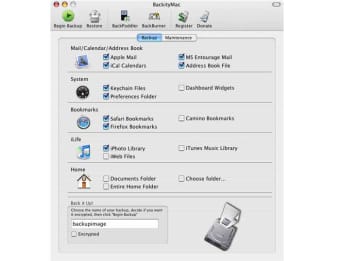
BackityMac lets you select what you consider to be your most important files and save them in a dmg. The application offers a simple menu view from which you check the files you'd like to backup, such as Apple Mail files, iCal calendars, or iPhoto and iTunes libraries.
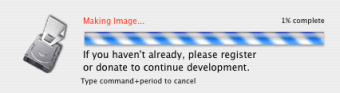
You can save files in a disk image (dmg) or have them burned in a CD or DVD. BackityMac can also restore all your files at the click of a button. A lesser known yet smart feature of BackityMac is that it can import music stored on your iPod back into your iTunes library, in case you've lost it.
BackityMac is simple to use but does include some limitations. For one you won't be able to properly clone your hard drive, meaning you're liable to forget files in the backup process. You won't be able to make incremental backups either so every time you want to save new files you'll have to start from scratch.
In all, BackityMac is a good program for those of you looking for a basic backup solution. For serious backups, find a program which can clone your hard drive, or use Time Machine.
Languages:
English
Recent changes in BackityMac:
- Fixing some other parsing errors. Believe me, using some special characters tens to cause a few issues, but it depends on the special characters
Limitations:
Limited to one free burn
OS requirements for BackityMac:
- OS: Mac OS X
Minimum requirements:
- Processor: PPC/Intel MHz
- Mac OS X 10.4.3 or later
- Select important files from menu
- Backup to CD, DVD or DMG
- Import songs from iPod
- Won't clone your hard drive
From the publisher of BackityMac
Have you ever wanted an easy way to backup all the important files in your home folder? Are you tired of sifting through the Library directory to find the folders you need to backup? Let's say you just want to backup your Apple Mail database file, not all you have to do is click the "Apple Mail" checkbox and click "Backup". Supported important files include:
- Apple Mail Files
- MS Entourage Files
- iCal Calendars
- Address Book database
- Safari, Firefox, Camino bookmarks
- iPhoto and iTunes Libraries
- iWeb website files
- Home Documents folder
- Full home folder backup
This is not some proprietary system, all backups are placed in a read-only disk image which ensures you can access it on any Mac. But what is backup without restore. Choose an image created by this program, and the backed up contents will automatically be detected for you, Then decided what you want to restore, and click "Restore". The contents will be placed back into their original directory automatically replacing it's contents. This is the perfect solution for those who want to be able to clone their home directory and replace it on another Mac untouched.
Sponsored Links
Programs similar to BackityMac
BackityMac options
Reviews for BackityMac in other languages
- BackityMac (Le test en français)
Your opinion is important!